
Compliance of the future is about building a resilient, scalable security posture that holds up against assessments, breaches, and evolving regulations. With complexity increasing, being prepared sooner rather than later isn’t just smart, it’s essential.
As frameworks like CMMC, ITAR, GDPR, and HIPAA continue to evolve, so do the risks of relying on manual, error-prone processes. That’s where compliance automation becomes not just a time-saver, but a strategic advantage. It helps you stay assessment-ready, mitigating costly slip-ups, and the ability to scale without the chaos.
We’ll break down how compliance automation can support your IT and security teams, the types of compliance management tools to consider, and what to look for when choosing a solution that fits your business and its specific needs.
🛡️ Want to Streamline Your Compliance With Automation?
See how Theodosiana helps automate access controls, encryption, and audit readiness.
Why Manual Compliance No Longer Scales
Spreadsheets and scattered documentation might have worked when your business was smaller, but once you start to scale, so do your risks. Manual compliance management doesn’t just slow you down, it opens you up to all kinds of problems, including:
- Delayed assessments from missing evidence or messy documentation.
- Burnout across security teams who are buried in repetitive admin tasks.
- Policy changes or new requirements slipping through the cracks.
- Gaps in access control, encryption, or audit logs that stay hidden until it’s too late.
Put simply, manual processes drive up the cost of compliance in time, money, and stress, which can all be avoided.
How Compliance Automation Helps
Compliance automation enables your team to manage controls, monitor policies, and generate reports without the daily overhead. Here are some ways it directly supports your IT and security functions:
Continuous Monitoring
Automated tools track configuration changes, access activity, and data movement across systems, alerting your team to potential violations in real-time.
Centralized Audit Trails
Automation platforms keep a consistent, time-stamped record of all relevant events, from user access to policy changes. This means no more piecing together log files.
Automated Encryption & Access Controls
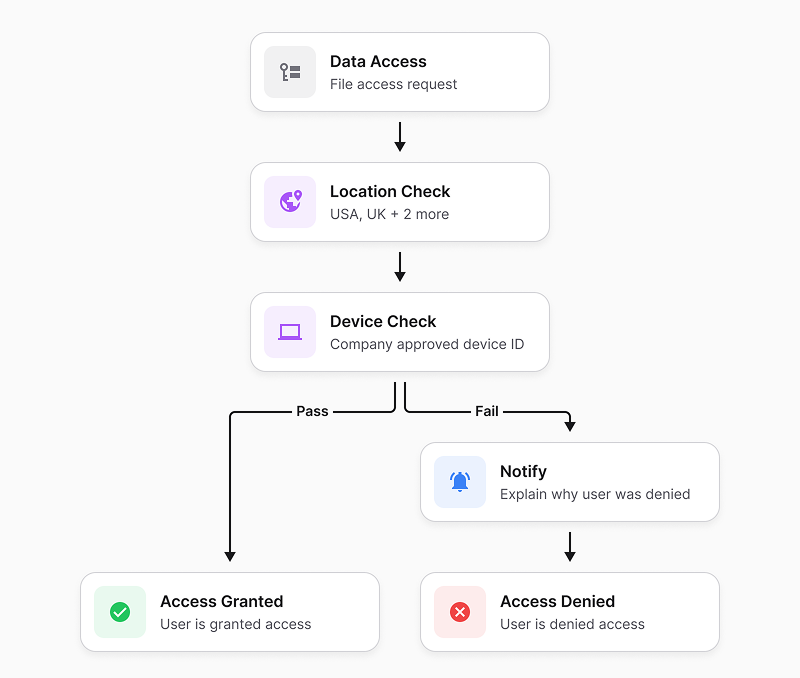
Compliance management tools like Theodosiana allow you to set rules for file-level encryption and attribute access controls. Once configured, they enforce these controls without manual input.
Reporting That’s Ready for Assessors
Whether you're preparing for an internal review or a third-party assessment, automation platforms generate pre-mapped reports aligned with specific frameworks, saving hours of manual work.
What to Look for in Compliance Management Tools
Not all platforms are created equal, and no one wants to use clunky, hard-to-navigate tools that can slow down your team. So when evaluating compliance management tools, here are some elements you might want to keep an eye out for:
- Framework Alignment - Find out whether the tool supports the frameworks your business needs to meet, like CMMC, ITAR, ISO 27001, or GDPR.
- Security-First Architecture - Is encryption enforced both at-rest and in-transit? Can you easily apply zero-trust principles and role-based access?
- Workflow Integration - Will the tool integrate into your existing stack (think Microsoft 365, GCP, and other core tools you use daily) without adding friction?
- Real-Time Alerts - Will your team get notified immediately about policy violations or unusual activity?
- Assessment-Ready Reporting - Can the platform automatically map and compile evidence to satisfy specific compliance controls?
- Intuitive User Experience - Is the UI usable for your team day-to-day? A clean, easy-to-navigate interface means less time learning the tool and more time maintaining compliance.
The Real-World Impact of Compliance Automation
Let’s say your business is onboarding a new government contract that requires CMMC 2.0 alignment. Without automation, your team might spend weeks collecting evidence, enforcing access restrictions, and generating reports.
With the right compliance automation tool in place, you could:
- Automatically restrict file access based on user roles, data sensitivity levels, and contextual factors such as time, location, or device.
- Maintain a real-time, exportable audit trail that captures how sensitive data is accessed and used, not just who has permission.
- Detect abnormal access patterns or unusual file activity (for example, rapid bulk access or repeated file openings) and automatically intervene by restricting access or alerting administrators before a policy violation or breach escalates.
Automation Makes Compliance Scalable
Automation becomes especially critical during periods of rapid growth, when new users, systems, and sensitive data are introduced at speed. Without automated enforcement, compliance gaps can scale just as quickly as the business itself.
If you’re navigating expansion right now, we explore this challenge in more detail in: How to Handle Compliance Challenges During Business Expansion.
🛡️ Don’t Let Manual or Outdated Processes Hold You Back!
Discover how the right tools can simplify compliance and scale with your growth.
FAQs: Maximizing Efficiency with Compliance Automation
Does automating compliance mean we don't need a security team?
No. Automation is designed to support your IT and security teams by removing the burden of repetitive administrative tasks. This prevents burnout and allows your experts to focus on high-level strategy and incident response, while the compliance automation software handles the day-to-day evidence collection and policy enforcement.
How does automation simplify the assessment process?
The most stressful part of an assessment is gathering proof. Automation platforms provide assessment-ready reporting by maintaining a centralized, immutable audit trail of every access decision and policy change. Instead of spending weeks searching for logs, you can generate a detailed report for your auditor in just a few clicks.